Getting started with Trusted Media
How to guide
This guide explains how to generate verifiable provenance for streaming video. It covers the signers, session keys, and claim required for C2PA, how to add CAWG metadata and identity assertions, how to host and reference the AIX document, and how the resulting stream is verified during playback.
Prerequisites and environment
You will need:
A Unified Origin instance capable of dynamic packaging for HLS/DASH.
A valid license key with Trusted Media enabled. This feature is currently in beta. If you would like to access it please contact support@unified-streaming.com
If using a trial license, internet access on host through ports 53 and 80.
OpenSSL command-line installed with version 3.6.1 or later.
Content, for example Tears of Steel from Blender Foundation.
The provenance data you want to carry with the content.
For this tutorial, you will create self-signed certificates and use those to sign the content. However, if you already have keys and certificates from a trusted CA you can skip the generation script and use them instead.
Step 1: Install and check your license key
Step 2: Create the AIX document
In this step we will create a configuration file which tells Unified Origin exactly what to do with C2PA.
An AIX document is a JSON-based exchange format used to carry authenticity and provenance information into the streaming workflow. Unified Origin reads the AIX document to determine which credentials to use, which metadata to attach, and how to generate the C2PA and CAWG assertions during packaging.
We will start with a minimal structure:
signers: at least one signer with:private_key: base64-encoded PEM format.public_certificate_chain: base64-encoded X.509 chain ordered from the end-entity (leaf) certificate upward.
session_keys: at least one session key with:private_key: base64-encoded PEM format.
claim:signer: referencing the signer entry that signs the C2PA claim.
Since the purpose of this tutorial is to use AIX documents to configure C2PA output from Unified Origin, we have provided two shell scripts to generate a self-signed certificate chain and the required keys. If you already have certificates for C2PA you can use them instead by including the base64 encoded certificate chain and private key in the AIX document instead.
First, to generate the C2PA Certificate Chain: Root CA, Intermediate CA, and Leaf certificate, and a session key:
#!/bin/bash
set -e

OPENSSL=${OPENSSL:-openssl}
if ! command -v "$OPENSSL" &> /dev/null; then
  echo "Error: $OPENSSL is not installed or not in PATH." >&2
  exit 1
fi

# Configuration
ALGORITHM="ed25519"
DAYS_ROOT=730
DAYS=365

# 1. Root CA
"$OPENSSL" genpkey -algorithm $ALGORITHM -out root-key.pem
chmod 600 root-key.pem

"$OPENSSL" req -x509 -new \
  -key root-key.pem \
  -out root-cert.pem \
  -days $DAYS_ROOT \
  -subj "/CN=Unified Tutorial Root" \
  -addext "basicConstraints=critical,CA:TRUE" \
  -addext "keyUsage=critical,keyCertSign,cRLSign"

# 2. Intermediate CA
"$OPENSSL" genpkey -algorithm $ALGORITHM -out intermediate-key.pem
chmod 600 intermediate-key.pem

cat > intermediate.ext <<EOF
basicConstraints=critical,CA:TRUE,pathlen:0
keyUsage=critical,keyCertSign,cRLSign
EOF

"$OPENSSL" req -new \
  -key intermediate-key.pem \
  -subj "/CN=Unified Tutorial Intermediate" | \
"$OPENSSL" x509 -req -in - \
  -CA root-cert.pem \
  -CAkey root-key.pem \
  -CAcreateserial \
  -out intermediate-cert.pem \
  -days $DAYS \
  -extfile intermediate.ext

# 3. Leaf Certificate (Content Signer)
"$OPENSSL" genpkey -algorithm $ALGORITHM -out leaf-key.pem
chmod 600 leaf-key.pem

cat > leaf.ext <<EOF
basicConstraints=critical,CA:FALSE
keyUsage=critical,digitalSignature
EOF

"$OPENSSL" req -new \
  -key leaf-key.pem \
  -subj "/C=NL/O=Unified Streaming Tutorial/OU=Content Signing/CN=Unified Streaming Tutorial Content Signer" | \
"$OPENSSL" x509 -req -in - \
  -CA intermediate-cert.pem \
  -CAkey intermediate-key.pem \
  -CAcreateserial \
  -out leaf-cert.pem \
  -days $DAYS \
  -extfile leaf.ext

# 4. Certificate chain
cat leaf-cert.pem intermediate-cert.pem > chain.pem

# 5. Verify certificate chain
"$OPENSSL" verify \
  -CAfile root-cert.pem \
  -untrusted intermediate-cert.pem \
  leaf-cert.pem

# 6. Generate private session key
"$OPENSSL" genpkey -algorithm ed25519 -out session-key.pem
chmod 600 session-key.pem

# 7. Clean up root and intermediate files
rm root-cert.pem root-cert.srl root-key.pem intermediate.ext intermediate-cert.pem intermediate-cert.srl intermediate-key.pem leaf.ext leaf-cert.pem
This script should produce a leaf key (leaf-key.pem), certificate chain (chain.pem), and session key (session-key.pem) which can be used in the following step.
After generating the keys and certificates you may create the AIX document. The following is an example script on how to read the certificates, base64 encode them and generate a complete AIX document.
#!/bin/bash
set -e

JQ=${JQ:-jq}
if ! command -v "$JQ" &> /dev/null; then
	echo "Error: $JQ is not installed or not in PATH." >&2
	exit 1
fi

PRIVATE_KEY_FILE="leaf-key.pem"
PUBLIC_CERT_FILE="chain.pem"
SESSION_KEY_FILE="session-key.pem"
OUTPUT_FILE="minimal.aix"

for file in "$PRIVATE_KEY_FILE" "$PUBLIC_CERT_FILE" "$SESSION_KEY_FILE"; do
	if [ ! -f "$file" ]; then
		echo "Error: File '$file' does not exist." >&2
		exit 1
	fi
done

private_b64=$(base64 < "$PRIVATE_KEY_FILE" | tr -d '\n')
public_b64=$(base64 < "$PUBLIC_CERT_FILE" | tr -d '\n')
session_private_b64=$(base64 < "$SESSION_KEY_FILE" | tr -d '\n')

"$JQ" -n \
	--arg private "$private_b64" \
	--arg public "$public_b64" \
	--arg session_key "$session_private_b64" \
	'{
		signers: {
			generator: {
				private_key: $private,
				public_certificate_chain: $public
			}
		},
		session_keys: {
			key_001: {
				private_key: $session_key,
				created_at: "2026-01-01T00:00:00Z",
				validity_period: 31536000
			}
		},
		claim: {
			signer: "generator"
		}
	}' > "$OUTPUT_FILE"

echo "Generated JSON OUTPUT"
cat "$OUTPUT_FILE"
Your resulting AIX document should look something like this:
 1{
 2  "signers": {
 3    "generator": {
 4      "private_key": "LS0tLS1C...=",
 5      "public_certificate_chain": "LS0tLS1C..."
 6    }
 7  },
 8  "session_keys": {
 9    "key_001": {
10      "private_key": "LS0tLS1...=",
11      "created_at": "2026-01-01T00:00:00Z",
12      "validity_period": 31536000
13    }
14  },
15  "claim": {
16    "signer": "generator"
17  }
18}
Step 3: Add creator assertions
Adding creator assertions to your AIX document lets you document your relationship with the media asset and explicitly assert who is responsible for it.
Since we are using Tears of Steel for this tutorial, we can use C2PA to add the explicit attribution and license details for the content.
We do this by adding a CAWG (Creator Assertions Working Group Technical Specifications) metadata assertion along with the identity assertion to prove who we are.
You can add these to your existing AIX document under assertions:
 1{
 2  "signers": {
 3    "generator": {
 4      "private_key": "LS0tLS1C...=",
 5      "public_certificate_chain": "LS0tLS1C..."
 6    }
 7  },
 8  "session_keys": {
 9    "key_001": {
10      "private_key": "LS0tLS1...=",
11      "created_at": "2026-01-01T00:00:00Z",
12      "validity_period": 31536000
13    }
14  },
15  "assertions": {
16    "metadata_assertion": {
17      "cawg.metadata": {
18        "@context": {
19          "dc": "http://purl.org/dc/elements/1.1/"
20        },
21        "dc:publisher": "Blender Foundation",
22        "dc:rights": "Creative Commons Attribution 3.0",
23        "dc:title": "Tears of Steel"
24      }
25    },
26    "identity_assertion": {
27      "cawg.identity": {
28        "signer": "generator",
29        "referenced_assertions": [
30          "metadata_assertion"
31        ]
32      }
33    }
34  },
35  "claim": {
36    "signer": "generator"
37  }
38}
The explanation of the two assertions follows below.
cawg.metadata
{
  "metadata_assertion": {
    "cawg.metadata": {
      "@context": {
        "dc": "http://purl.org/dc/elements/1.1/"
      },
      "dc:publisher": "Blender Foundation",
      "dc:rights": "Creative Commons Attribution 3.0",
      "dc:title": "Tears of Steel"
    }
  }
}
This is a JSON-LD document that can contain any metadata you want to attach to the asset.
For key fields like Title, Publisher, Identifier, and Description, the Dublin Core (DC) vocabulary is commonly used.
cawg.identity
{
  "identity_assertion": {
    "cawg.identity": {
      "signer": "generator",
      "referenced_assertions": [
        "metadata_assertion"
      ]
    }
  }
}
This assertion binds the metadata to a specific party and signs that relationship.
It must contain:
signer: the name of the party in thesignerslist that will sign the assertion.referenced_assertions: a list of IDs of thecawg.metadataassertions you want this identity to cover.
For this tutorial we just use the generator key and certificate to sign the CAWG metadata.
Putting it all together
Your AIX document now includes:
signers.generatorsession_keysassertionswith linkedcawg.metadataandcawg.identity.claim.signerstill pointing togenerator.
Unified Origin uses this structure to:
Sign the claim with the
generatorsigner.Include the creator metadata and identity as CAWG assertions in the C2PA document.
Allow downstream validators and players to see not only that the media is authentic, but also who published it and how it should be attributed.
Step 4: Host and reference the document
Once the AIX file is ready, either host it at a URL that Unified Origin can
reach or place it alongside your content. Create a server manifest with the
--aix option so it can fetch the document during packaging, for example:
#!/bin/bash

mp4split -o minimal.ism \
 --aix=minimal.aix \
 tears-of-steel-avc1-1500k.mp4 \
 tears-of-steel-aac-128k.mp4
Because Unified Origin is stateless, it requests the AIX document for each incoming request. In production, cache the response from the AIX server so identical requests do not go upstream every time.
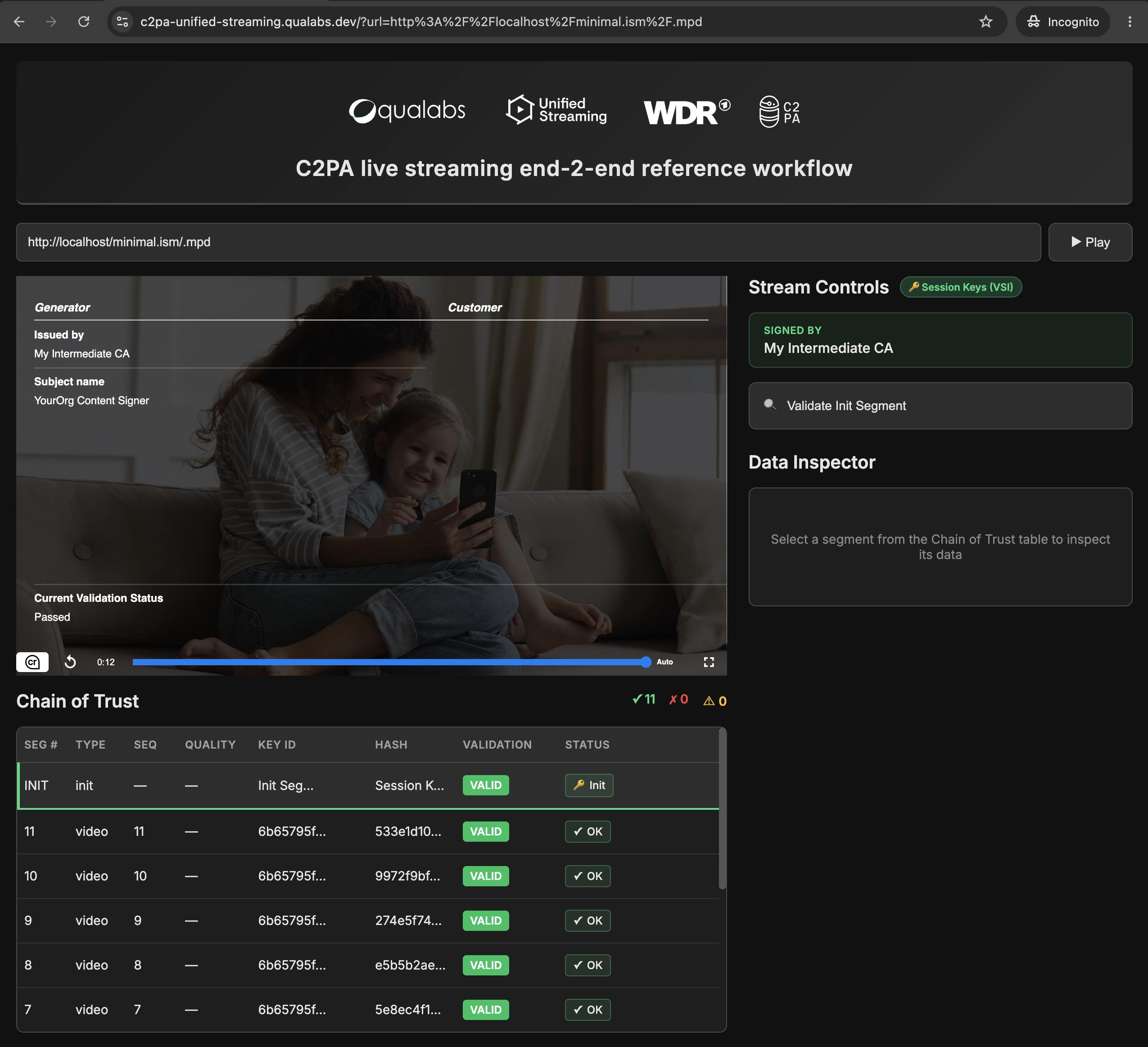
Step 5: Play and verify the stream
After packaging, the stream is delivered through the standard dynamic packaging workflow. During playback, the player verifies the signed data according to C2PA and CAWG requirements so the content can be confirmed as authentic and untampered.
The stream plays normally, the player can verify authenticity, and the provenance data shows the expected identity assertions.
Test your stream by posting your URL here: https://demo.unified-streaming.com/c2pa-test-player/
Next steps
Once the basic flow works, you can deepen your usage:
Use the AIX documentation to explore advanced options like dynamic AIX generation per event or per channel, key rotation strategies, and caching recommendations.
Consult the C2PA Live Video specification chapter 19 for detailed semantics of live segment signing,
bmff-hash-mapbehavior, and verifiable segment info.Use Trusted Media's capabilities to integrate provenance into newsroom tools, OTT platforms, or sports workflows, as demonstrated in the joint Unified Streaming / WDR / Qualabs prototype where every segment is signed and validated at playback.
Concepts and terminology
- AIX document
The Authentication Information eXchange document that contains metadata, certificates, and signing relationships required for the generation of C2PA metadata workflow. AIX is an open specification developed by Unified Streaming.
- CAWG
Creator Assertions Working Group, which defines identity and metadata assertions used alongside C2PA.
- C2PA
Coalition for Content Provenance and Authenticity (C2PA). The specification for content authenticity standard used to sign and verify media provenance information.
- Customer metadata
The descriptive information the customer wants associated with the content, such as title, publisher, or asset ID.
- Customer certificate
The X.509 certificate used to establish the customer's identity in the provenance chain.
- Generator certificate
The X.509 certificate used by the media packager packaging system to sign the provenance data it generates.
- Unified Origin
The media packagering and origin component that reads AIX documents and generates the signed streaming output.
- Dynamic packaging
The normal streaming workflow where content is packaged on demand for delivery over HLS or DASH.
- Player verification
The playback process of validating checking the signatures and provenance data to confirm authenticity.
- X.509 certificate
A standard digital certificate format used to bind an identity to a public key.
- Provenance chain
The verifiable sequence connecting the content, metadata, identities, and signatures from source to playback.
For further C2PA and CAWG specification terminology please refer to the following links Content Credentials: C2PA Technical Speficiation and Creator Assertions Working Group Technical Specifications.